
Custom Santa Video Message: Santa Says Your Words
Updated · Turnly
Take a photo of your living room with nobody in it and upload it below: a line where Santa sits down and says "Merry Christmas, Emma! I know you have been very kind this year." is already typed in on "Come alive". Change the name and the words, and the AI makes a 10-second video of Santa walking into your room and saying them to the camera, $9.99, no sign-in. In our test he said the line word for word.
Real Santa videos from room photos
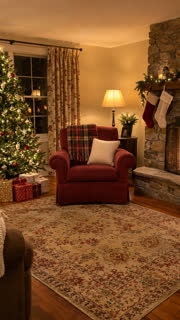 The photo
“Santa Claus walks in, sits in the red armchair, smiles into the camera and says, Merry Christmas, Emma! I know you have been very kind this year.”
Make one like this →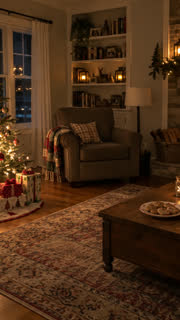 The photo
“Santa Claus quietly walks in from the right, puts a gift under the tree, takes a cookie and waves at the camera”
Make one like this →In brief
- What it is
- Take a photo of your living room, type what Santa should say with the name in it, and the AI makes a 10-second video of Santa walking in, sitting down and saying it to the camera.
- Best for
- A personal Christmas message from Santa for Christmas Eve or morning, filmed in your own home, without booking a Santa or sending a photo of your child.
- Words
- Up to about 20 words in English, inside the 200-character box. Letters, numbers and simple punctuation only (no question marks, quotes or colons).
- Price
- $9.99 for 10 seconds in 720p, from $4.99 for 10 seconds in 720p. One payment, no subscription, no sign-in.
- Ready
- 2 to 5 minutes after you pay. Pick 16:9 for the TV or 9:16 for a phone.
- Card
- "Make it a card to send" adds Merry Christmas, their name and your message, and gives you a link for the family chat.
- If it fails
- Failed videos give their credits back automatically. A video that comes out clearly broken gets its cost back.
Step by step
- Take a photo of the room with your tree, from the doorway at chest height, lights on and nobody in it. A chair or sofa in view gives Santa somewhere to sit.
- Upload it above (no sign-in needed). In the line, change Emma to their name and write what Santa says after "says,". Keep it to one or two short sentences.
- Pick 16:9 wide to play it on the TV, or 9:16 for a phone.
- Pay once: a 10-second 720p video on Seedance 2.0 Fast is $9.99 on its own (one payment, no subscription), or 40 credits; credits from $9.99 for 40.
- Wait 2 to 5 minutes, watch it once with sound on, and download the MP4.
Santa messages to try
- "Santa Claus walks in, sits in the red armchair, smiles into the camera and says, Merry Christmas, Emma! I know you have been very kind this year." (the sample above; say "the armchair" or "the sofa" to match your room).
- "Santa Claus sits by the tree, waves and says, Hello Leo! I saw you learned to ride your bike. Ho ho ho!"
- "Santa Claus puts a present under the tree, turns to the camera and says, This one is for Mia. Be good and go to sleep early!"
- "Santa Claus warms his hands by the fireplace and says, Merry Christmas to the whole Garcia family!"
How to write the words so Santa says them clearly
- Put what he says after the word "says," and keep the action before it short: walking in, sitting down, a wave.
- One or two short sentences, about 20 words. A longer speech gets cut or rushed in 10 seconds.
- Write names the way they sound if they are unusual ("Aoife" as "Eefa"), since the AI reads the word aloud.
- No question marks, quotes or colons: the box takes letters, numbers, spaces and ' & ! . , - only. "Have you been good" works without the question mark.
- English gives the clearest speech. We haven't tested Santa speaking other languages.
Which photo works best?
- Your own living room, so it's clearly your house: your tree, your fireplace, your armchair.
- Empty, taken from the doorway, with floor space for Santa to walk in and a seat for him.
- Lights on and the tree lit; a dark photo makes a dark video.
- No people in it: photos of anyone under 18 aren't allowed here, and the message works without them.
Does Santa really say the name?
In our test, yes: Santa walked in, sat in the armchair and said "Merry Christmas, Emma! I know you have been very kind this year" word for word, with his mouth moving to the words. AI voices can still slur a rare name or skip a word now and then, so watch it once with sound on before you show it. The sample above is that test, shown as it came out.
Can I write the name on the video too?
The video itself has no text. Press "Make it a card to send" when it's ready: pick Merry Christmas, add their name, your message and who it's from, and you get a link that plays the video with your words, marked as AI-made. Or add a caption in your phone's editor.
What it can't do
- Use a photo of your child, or put anyone from another photo into the room: it's your room and a generated Santa.
- Make Santa look like a particular person or use a voice you upload.
- Speak a long letter: about 20 words fit in one video. Make two videos for a longer message.
What's the last day to make it?
There's nothing to ship: the video is ready 2 to 5 minutes after you pay, so Christmas Eve works. Make it a few days early anyway, so you have time to change a word and make it again.
Other Christmas videos
- Santa in My House AI : Santa sneaks in, leaves a gift and slips out, no message.
- AI Christmas Video : a Christmas photo of adults or your pet, brought to life.
- Christmas Elf Dance : you or your pet turn into a dancing elf.
- Elf on the Shelf AI Video : your own elf caught moving on the night camera.
How much does it cost?
From $4.99 for a 10-second 720p clip on Seedance 2.0 Mini; a 10-second 720p video on Seedance 2.0 Fast is $9.99. You see the price before you pay, there's no subscription, and a video that comes out clearly broken gets its cost back.
Rules
- Photos of yourself, of adults who agreed, of your own pets, or of places and things.
- Never anyone under 18, and no public figures or celebrities.
Related
- Turn Photo Into Video
- Elf on the Shelf AI Video
- Cat on Ultra Bee AI
- Housewife Dance AI
- Teach Me How to Dougie AI
- Fish Cutting Meme AI
- AI Dunk Trend
- Dog Elevator Prank AI
- Shoulder Carry "I'm the One" AI
- Monkey Eating Apple AI
- Ba Ba Ba Dance AI
- Closing Door Prank AI
- AI Christmas Elf Dance
- Wipe Me Down AI Dance
- Flamingo Floatie AI
- First Time in a Fancy Cafe AI
- Zombie Ambush AI
- Pimpwalk Entrance AI
- Hit the Road Dude AI
- Toy Car to Real Car AI
- Coffee Making AI
- Goodbye 2026 Welcome 2027 AI Video
- Toc Toc Dance AI
- BbY WOW Dance AI
- Kung Fu Cat AI
- C-Walk AI Dance
- Wizard Cat Dance AI
- Dog Coffee Fail AI
- AI Caricature Trend
- AI Aging Filter Video
- Angel or Devil Filter AI
- Enchantress Filter AI
- Animate Old Photos
- AI Pet Video Generator
- AI Dance Video Generator
- AI Hug Video Generator
- Pet Memorial Video: Your Pet at the Rainbow Bridge
- AI Birthday Video Maker From a Photo
- AI Christmas Video Generator From a Photo
- Santa in My House AI: Catch Santa on Camera
- Elf on the Shelf AI Video: Your Elf Caught on Camera at Night
- AI New Year Video Generator: Goodbye 2026, Welcome 2027
- AI Wedding Video From a Photo
- AI Graduation Video From a Photo
- AI Memorial Video From a Photo of Someone You Lost
- Free Image to Video Prompt Generator
- Kling AI Alternative for Photo to Video, No Subscription
- CapCut Alternative for AI Trend Videos From One Photo
- How to do the AI trend on TikTok with your own photo
- Can ChatGPT turn a photo into a video?
- Is there a free way to turn a photo into a video?
- What's the easiest website to make my dog do a goofy TikTok dance from a photo?
- How do I make a cute AI anniversary video from a photo of me and my partner?
- Which website can turn my photo into a TikTok AI trend video? 7 compared