
AI Wedding Video From a Photo
Updated · Turnly
Upload one wedding photo with both of you in it below: the words "they look at each other and laugh, then wave to the camera as confetti falls around them" are already typed in on "Come alive". The AI turns it into a 10-second vertical video in a few minutes, $9.99, no sign-in. It works with your parents' or grandparents' old wedding photo too, for their anniversary.
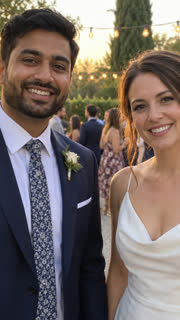 The photo
Ways couples use it
- A thank-you video to guests, from your favourite photo of the day.
- Your parents' or grandparents' wedding photo brought to life for a big anniversary (pick "Come alive" and delete the line for a gentle smile and blink).
- A save-the-date or engagement photo that moves, for Stories.
- A first-anniversary post from the wedding photo.
Wedding lines to try
- "they look at each other and laugh, then wave to the camera as confetti falls around them" (the sample above).
- "they raise their champagne glasses and toast, laughing".
- "they walk hand in hand toward the camera as petals fall".
- The AI follows the words as best it can and keeps your faces, clothes and venue as they are in the photo.
Step by step
- Pick one photo with both of you, faces clear and not too small: waist-up works best. For an old print, scan it flat without glare.
- Upload it above (no sign-in needed) and edit the words if you like, up to 200 characters.
- Pay once: a 10-second 720p video on Seedance 2.0 Fast is $9.99 on its own (one payment, no subscription), or 40 credits; credits from $9.99 for 40.
- Wait 2 to 5 minutes and download the MP4; add your names, date and song when you post or send it.
Can it put two separate photos together?
No. It makes the video from one photo, so the couple has to be in the same picture. Both people must be adults who agree to it, or your own family who have passed away.
Which photo works best?
- Both of you in the same photo, from the waist up, faces toward the camera and not too small.
- Your favourite photo of the day rather than a group shot: big groups come out softer and hands can warp.
- For your parents' or grandparents' wedding photo, scan the print flat in even light, without glare. Black and white works.
- Confetti, petals or a toast don't have to be in the photo: the AI adds them from the words.
Can I play it at the reception?
Yes. Pick 16:9 wide so it fills a screen or projector, and 1080p if the model you pick offers it. Each video is one shot of up to 15 seconds: loop it during cocktail hour, or use it to open your slideshow and cut to the photos. Give the MP4 to the DJ or venue a week before, and bring a copy on a USB stick.
Can I add our names and the date?
Not on this site: the video has no text. Add your names, the date and your song in CapCut, Canva or Instagram before you send or post it.
How much does it cost?
From $3.99 for a 5-second 480p clip on Seedance 2.0 Mini; a 10-second 720p video on Seedance 2.0 Fast is $9.99. You see the price before you pay, there's no subscription, and if you're not happy with your first paid video you get a full refund within 7 days.
Rules
- Photos of yourself, of adults who agreed, of your own pets, or of places and things.
- Never anyone under 18, and no public figures or celebrities.
Related
- Turn Photo Into Video
- Toc Toc Dance AI
- BbY WOW Dance AI
- Kung Fu Cat AI
- C-Walk AI Dance
- Wizard Cat Dance AI
- Dog Coffee Fail AI
- AI Caricature Trend
- AI Aging Filter Video
- Angel or Devil Filter AI
- Enchantress Filter AI
- Animate Old Photos
- AI Pet Video Generator
- AI Dance Video Generator
- Pet Memorial Video: Your Pet at the Rainbow Bridge
- AI Birthday Video Maker From a Photo
- AI Christmas Video Generator From a Photo
- AI Graduation Video From a Photo
- AI Memorial Video From a Photo of Someone You Lost
- Free Image to Video Prompt Generator
- Kling AI Alternative for Photo to Video, No Subscription
- How to do the AI trend on TikTok with your own photo
- Can ChatGPT turn a photo into a video?
- Is there a free way to turn a photo into a video?
- What's the easiest website to make my dog do a goofy TikTok dance from a photo?
- How do I make a cute AI anniversary video from a photo of me and my partner?
- Which website can turn my photo into a TikTok AI trend video? 7 compared