
AI Birthday Video Maker From a Photo
Updated · Turnly
Upload one photo below: the words "she blows out the candles on the cake, laughs and looks at the camera" are already typed in on "Come alive". The AI turns it into a 10-second vertical video in a few minutes, $9.99, no sign-in. Change the words for your photo, for a pet too, then add "Happy birthday" and your song when you post.
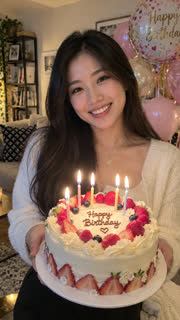 The photo
Lines to try
- "she blows out the candles on the cake, laughs and looks at the camera" (the sample above; the cake has to be in the photo).
- "he raises his glass, smiles and says cheers".
- "the cat looks at the camera and slowly blinks", or pick "Dance" for a birthday dance.
- The AI follows the words as best it can and keeps the people, place and clothes as they are in the photo.
Step by step
- Pick a photo of the birthday person (an adult who agrees) or your own pet, face clear and not too small.
- Upload it above (no sign-in needed). Edit the words, up to 200 characters; keep 9:16 for TikTok, Reels and Stories.
- Pay once: a 10-second 720p video on Seedance 2.0 Fast is $9.99 on its own (one payment, no subscription), or 40 credits; credits from $9.99 for 40.
- Wait 2 to 5 minutes, download the MP4, then add your text and song in the app you post with.
What it can't do
- Write "Happy birthday" or a name on the video: add the text when you post.
- Use a song you choose: the sound is generated; turn it off and add your song.
- Make a slideshow of many photos or add people who aren't in the photo.
Ways people use it
- A birthday post: the candles from your favourite photo, in 9:16 for Stories and Reels.
- A message to a friend far away, sent on the day.
- A screen at a 30th, 50th or 70th party: an old photo of them as a young adult, brought to life (see Animate old photos).
- Your pet's birthday: "the dog in the party hat wags his tail and tilts his head".
- Give a friend credits as a gift link so they can make their own (see Gift).
Which photo works best?
- The birthday person (an adult who agrees) or your own pet, face clear and toward the camera.
- The cake has to be in the photo for the candles, and the glass for a toast.
- From the waist up works better than a far-away shot.
Can I make one for a child's birthday?
No. Photos of anyone under 18 aren't allowed here. Make one with your pet, or with the adults at the party who agree.
How much does it cost?
From $3.99 for a 5-second 480p clip on Seedance 2.0 Mini; a 10-second 720p video on Seedance 2.0 Fast is $9.99. You see the price before you pay, there's no subscription, and if you're not happy with your first paid video you get a full refund within 7 days.
Rules
- Photos of yourself, of adults who agreed, of your own pets, or of places and things.
- Never anyone under 18, and no public figures or celebrities.
Related
- Turn Photo Into Video
- Toc Toc Dance AI
- BbY WOW Dance AI
- Kung Fu Cat AI
- C-Walk AI Dance
- Wizard Cat Dance AI
- Dog Coffee Fail AI
- AI Caricature Trend
- AI Aging Filter Video
- Angel or Devil Filter AI
- Enchantress Filter AI
- Animate Old Photos
- AI Pet Video Generator
- AI Dance Video Generator
- Pet Memorial Video: Your Pet at the Rainbow Bridge
- AI Christmas Video Generator From a Photo
- AI Wedding Video From a Photo
- AI Graduation Video From a Photo
- AI Memorial Video From a Photo of Someone You Lost
- Free Image to Video Prompt Generator
- Kling AI Alternative for Photo to Video, No Subscription
- How to do the AI trend on TikTok with your own photo
- Can ChatGPT turn a photo into a video?
- Is there a free way to turn a photo into a video?
- What's the easiest website to make my dog do a goofy TikTok dance from a photo?
- How do I make a cute AI anniversary video from a photo of me and my partner?
- Which website can turn my photo into a TikTok AI trend video? 7 compared