
Evergreen The angel or devil meter
Angel or Devil FilterAI
Upload one photo: an angel and a devil meter count up over your head, then you get the halo, the horns or a tie. You choose which before you make it.
10s · Up to 1080p · No watermark
 Photo
Video
Photo
Video
The trend
How do I make the angel or devil filter video from a photo?
Upload one photo, pick devil, angel or tie, and get a 10-second vertical video: two meters count up over your head while you look nervous, then a halo floats down, red horns grow or it's a dead heat.
- You need
- One sharp photo. One person, space above the head. JPG, PNG or WebP.
- You get
- A 10 to 10-second MP4 (9:16) up to 1080p, with a ticking count-up, a drum roll and a chime or whoosh, no watermark, usually in 2 to 5 minutes.
- Price
- A 10-second 720p video on Seedance 2.0 Fast uses 40 credits; credits from $9.99, or subscribe.
- Refund
- Failed videos give their credits back automatically. Not happy with your first paid video? Full refund within 7 days.
- Limits
- The numbers are drawn by the AI and can come out a bit off; the result you pick always happens. One person per video; adults only, with their OK.
What is the Angel or Devil Filter meme?
The angel or devil meter is an old TikTok face effect, with posts going back to 2021: two percentages count up over your head and decide whether you're an angel or a devil. It keeps coming back, now as AI videos made from a photo.
What happens in the video
- Meters count up from 0%
- Neck and neck, nervous lip bite
- The result: halo, horns or a tie
- The reaction
Best photo for a Angel or Devil Filter video
One person, face to the camera, with some space above the head for the meters.
Post it like the meme
Ask people to guess the result before it lands. Try one of these:
- I knew it 😈
- the meter has spoken 😇
- half angel half devil, as expected
The photo
How it works
How to make a Angel or Devil Filter video
How it works →- Add your photo
Upload one sharp photo. One person, space above the head. No sign-in, no password and no app: it all happens on this page.
- Choose and make
Pick the length, quality and format, and see the price before you start.
- Download and post
Your MP4 is ready in a few minutes in My videos, with no watermark. Label it as AI-generated when you post.
Templates
More effects
All templates → New this weekAI CaricatureUpload one photo: it swipes into a glossy 3D caricature of you, big head and all, that frowns, then grins smugly and winks.Try it →
 New this weekAI Aging FilterUpload one photo and watch yourself age on the beat: about 25, 40, 60 and 80, same pose and place, ending with a warm smile.Try it →
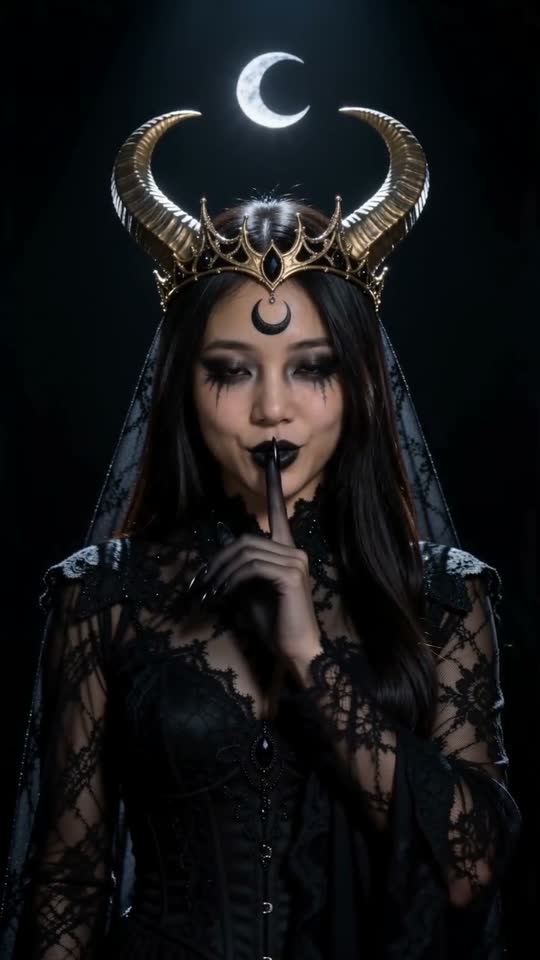 New this weekEnchantress FilterUpload one photo: a black clawed hand rises out of the dark and takes yours, sweeps across the lens, and you're back as a moon witch with a gold crescent crown. Shh.Try it →
 New this weekToc Toc DanceUpload one photo and you do the Toc Toc dance: the one-foot hop, the knock on an invisible door, the skip-kicks across the room and the arms-wide finish.Try it →
 New this weekBbY WOW DanceUpload one photo and you do the BbY WOW trend: sway onto the dance floor, pop a pastry in on the beat, chew with a dead-straight face and spin away.Try it →
 New this weekKung Fu CatUpload one photo of your cat or dog and it sits up like a kung fu master: guard up, high kick, paw chop, and the tissue tears in half. Twice.Try it →
Pricing
How much does a Angel or Devil Filter video cost?
Buy credits once or subscribe. Credits never expire, and failed videos give them back. Or subscribe from $14.90/month
Starter
$9.99
⚡ 40 credits
$0.25 per credit
About 1 video of 10s at 720p
Popular
$19.90
⚡ 120 credits
$0.166 per credit
About 3 videos of 10s at 720p
Creator
$29.90
⚡ 200 credits
$0.150 per credit
About 5 videos of 10s at 720p
FAQ
Angel or Devil Filter AI FAQ
Is the result random?
No: you pick devil, angel or tie before you make it.
Is it the TikTok effect?
It's a video made by AI from your photo that looks like the effect, not the live TikTok filter.
What sound does it have?
A ticking count-up, a drum roll and a chime or whoosh; you can turn it off.
How do I make my own Angel or Devil Filter video?
Upload one clear photo (no sign-in needed), pick the options, then pay for just that video or use credits (a 10-second 720p video on Seedance 2.0 Fast uses 40 credits). Download the MP4 a few minutes later and post it.
Do I need to sign up?
No. Add your photo and make the video right away: it stays in My videos on this browser. Sign in with Google to keep your videos on any device, buy credit packs or send a gift.
How long does it take?
Usually 2 to 5 minutes. The video shows up in My videos as soon as it's ready, even if you close the page.
Is it free?
No. Videos use credits: from $9.99 for 40 credits, or with a subscription. Credits are taken only when a video starts and given back if it fails.
How long do you keep my photos and videos?
Photos are deleted automatically after 30 days (after 2 days if you never made a video with them). Videos stay in My videos until you delete them, and you can delete everything from your account at any time. Your photos are never used to train AI models.
What if a video fails?
The credits go back to your balance automatically and you can try again. Not happy with your first paid video? Email us within 7 days for a full refund.
Do credits expire?
No. Credits you buy or get as a gift never expire. Subscription credits stay too, even after you cancel.
Can I cancel my subscription?
Yes, any time from My videos. It stops at the end of the period you paid for, and you keep your credits.
Can I give credits to a friend?
Yes. Turn any number of your credits into a gift link, or buy a pack as a gift. Your friend signs in, opens the link, and the credits are theirs.
How do I pay?
Checkout is run by Waffo Pancake, our Merchant of Record: Visa, Mastercard, Apple Pay or Google Pay. Prices are in US dollars.
Is Turnly an app, a filter or the official Angel or Devil Filter maker?
No. Turnly is an independent website, not made by or affiliated with the creators of the Angel or Devil Filter meme, TikTok or CapCut. There's no app or live filter: you upload a photo in your browser and get a new AI video. It never uses or edits the original clip.
Turnly guides
Make your Angel or Devil Filter video
One photo in, one video out, in a few minutes. No app, no editing.