
AI Memorial Video From a Photo of Someone You Lost
Updated · Turnly
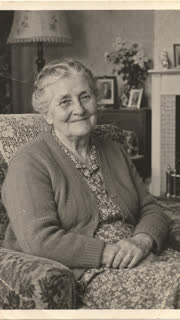
Upload the photo below with "Come alive" already picked: the AI adds gentle, natural motion, so your loved one blinks, breathes and smiles, and the room or the trees move a little. You get a 10-second video in a few minutes for $9.99, no sign-in, to play at a memorial, add to a tribute slideshow or keep for the family. Old black-and-white prints work too.
 The photo
What it does, and what it doesn't
- Keeps their face, clothes and the look of the photo as they are, and only adds motion: a smile, a blink, a turn of the head.
- Doesn't make them speak or say words, and doesn't add people who weren't in the photo.
- When you share it, say it was made with AI, so nobody mistakes it for a recording.
Gentle lines to try
- Leave the words empty: a quiet smile and blink, as in the sample above.
- "she turns to the camera and smiles warmly".
- "he looks out over the water as the wind moves the trees".
- Pick "Wave hello" for a wave goodbye.
Step by step
- Choose a clear photo where their face fills a good part of the frame. Scan a print flat in even light.
- Upload it above (no sign-in needed) and add a line if you like.
- Pay once: a 10-second 720p video on Seedance 2.0 Fast is $9.99 on its own (one payment, no subscription), or 40 credits; credits from $9.99 for 40.
- Wait 2 to 5 minutes and download the MP4 for the service, the slideshow or the family chat.
Whose photo can I use?
Your own family who have passed away, or adults who agreed. Only photos taken when the person was an adult, and no public figures. For a pet, see the pet memorial video page.
Ways families use it
- On the screen at the funeral or memorial service: pick 16:9 wide and let it loop.
- As the opening of a tribute slideshow, before the photos.
- In the family chat, or on the anniversary of their passing.
- From an old print of a grandparent you never met, so the children of the family can see them move.
Which photo works best?
- A portrait where their face fills a good part of the frame, looking toward the camera.
- Scan old prints flat, in even light, without glare. Black and white and sepia are fine; the video keeps that look.
- In a group photo, crop it to them before you upload.
- Tiny or very blurry faces give a softer video: use the clearest photo you have.
Will it still look like them?
It starts from the photo, so the face, clothes and place stay as they are, and the AI only adds the motion. Small differences can happen in some frames, so watch it before you share it. For the gentlest result, keep "Come alive" and leave the line empty.
Can I play it at the service?
Yes. Download the MP4 and give it to whoever runs the screen, or play it from a laptop or a USB stick. One video is one shot of up to 15 seconds; set it to loop, or put it at the start of your slideshow in PowerPoint, Canva or CapCut.
How much does it cost?
From $3.99 for a 5-second 480p clip on Seedance 2.0 Mini; a 10-second 720p video on Seedance 2.0 Fast is $9.99. You see the price before you pay, there's no subscription, and if you're not happy with your first paid video you get a full refund within 7 days.
Rules
- Photos of yourself, of adults who agreed, of your own pets, or of places and things.
- Never anyone under 18, and no public figures or celebrities.
Related
- Turn Photo Into Video
- Toc Toc Dance AI
- BbY WOW Dance AI
- Kung Fu Cat AI
- C-Walk AI Dance
- Wizard Cat Dance AI
- Dog Coffee Fail AI
- AI Caricature Trend
- AI Aging Filter Video
- Angel or Devil Filter AI
- Enchantress Filter AI
- Animate Old Photos
- AI Pet Video Generator
- AI Dance Video Generator
- Pet Memorial Video: Your Pet at the Rainbow Bridge
- AI Birthday Video Maker From a Photo
- AI Christmas Video Generator From a Photo
- AI Wedding Video From a Photo
- AI Graduation Video From a Photo
- Free Image to Video Prompt Generator
- Kling AI Alternative for Photo to Video, No Subscription
- How to do the AI trend on TikTok with your own photo
- Can ChatGPT turn a photo into a video?
- Is there a free way to turn a photo into a video?
- What's the easiest website to make my dog do a goofy TikTok dance from a photo?
- How do I make a cute AI anniversary video from a photo of me and my partner?
- Which website can turn my photo into a TikTok AI trend video? 7 compared