
Pet Memorial Video: Your Pet at the Rainbow Bridge
Updated · Turnly
Upload a favourite photo of your pet below. The words for the rainbow bridge are already typed in: the AI brings the photo to life, your pet gets up, wags and walks slowly toward a soft rainbow in golden light. You get a 10-second video in a few minutes for $9.99, no sign-in. Change "the dog" to "the cat" or to their name, or delete the line for a quiet moment: a blink, a breath, the grass moving.
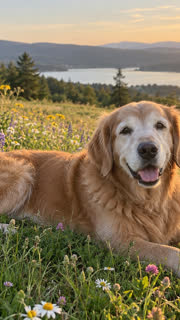 The photo
Ways to remember them
- The rainbow bridge (already typed in): they walk toward a glowing rainbow, as in the sample above.
- A quiet moment: delete the line and keep "Come alive": they blink, breathe and look at you.
- Their habit: "she tilts her head and wags her tail", "he stretches and lies back down in the sun".
- A wave goodbye: pick "Wave hello" and they lift a paw to the camera.
Step by step
- Choose a clear photo of your own pet: face visible, in good light, the whole body if you want them to walk.
- Upload it above (no sign-in needed). Edit the words if you like, up to 200 characters.
- Pay once: a 10-second 720p video on Seedance 2.0 Fast is $9.99 on its own (one payment, no subscription), or 40 credits; credits from $9.99 for 40.
- Wait 2 to 5 minutes, then download the MP4 to keep or to share with family.
What to expect
It starts from your photo, so your pet keeps their look; the rainbow and the light are added by the AI and come out a little different each time. Small or blurry photos give a softer result. It can't put two pets from separate photos together.
Which photo works best?
- Their face clear and toward you, in good light.
- The whole body in the frame if you want them to get up and walk; a close-up for a blink and a look.
- Outdoors or near a window gives the light and the rainbow somewhere to go.
- Only one pet per photo, unless they were photographed together.
Ways to keep it
- On a digital photo frame that plays MP4 videos.
- In the family chat, or on the day they passed each year.
- As the start of a slideshow of their photos, in Canva or CapCut.
Will it still look like them?
It starts from your photo, so their colours, markings and face stay as they are. Watch it before you share it: if a frame doesn't feel like them, try again with a clearer photo or a quieter line.
How much does it cost?
From $3.99 for a 5-second 480p clip on Seedance 2.0 Mini; a 10-second 720p video on Seedance 2.0 Fast is $9.99. You see the price before you pay, there's no subscription, and if you're not happy with your first paid video you get a full refund within 7 days.
Rules
- Photos of yourself, of adults who agreed, of your own pets, or of places and things.
- Never anyone under 18, and no public figures or celebrities.
Related
- Turn Photo Into Video
- Toc Toc Dance AI
- BbY WOW Dance AI
- Kung Fu Cat AI
- C-Walk AI Dance
- Wizard Cat Dance AI
- Dog Coffee Fail AI
- AI Caricature Trend
- AI Aging Filter Video
- Angel or Devil Filter AI
- Enchantress Filter AI
- Animate Old Photos
- AI Pet Video Generator
- AI Dance Video Generator
- AI Birthday Video Maker From a Photo
- AI Christmas Video Generator From a Photo
- AI Wedding Video From a Photo
- AI Graduation Video From a Photo
- AI Memorial Video From a Photo of Someone You Lost
- Free Image to Video Prompt Generator
- Kling AI Alternative for Photo to Video, No Subscription
- How to do the AI trend on TikTok with your own photo
- Can ChatGPT turn a photo into a video?
- Is there a free way to turn a photo into a video?
- What's the easiest website to make my dog do a goofy TikTok dance from a photo?
- How do I make a cute AI anniversary video from a photo of me and my partner?
- Which website can turn my photo into a TikTok AI trend video? 7 compared