
AI Christmas Video Generator From a Photo
Updated · Turnly
Upload one photo below: the words "she opens the red gift box, gasps with joy and laughs while snow falls outside the window" are already typed in on "Come alive". The AI turns it into a 10-second vertical video in a few minutes, $9.99, no sign-in. Change the words to fit your photo, send it as a video Christmas card, or post it with your own Christmas song.
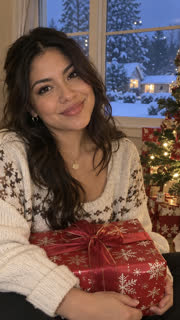 The photo
Christmas lines to try
- "she opens the red gift box, gasps with joy and laughs while snow falls outside the window" (the sample above; the gift has to be in the photo).
- "the dog in the Santa hat wags his tail and tilts his head as snow starts to fall".
- "they raise their mugs of hot chocolate by the fireplace and laugh".
- "the tree lights twinkle and snow falls softly over the house" for a photo of your home or street.
- Or pick "Wave hello" for a Merry Christmas wave to the camera, or "Dance" for a dance by the tree.
Step by step
- Pick a photo of yourself, an adult who agrees, your own pet, or your decorated home. Faces clear and not too small.
- Upload it above (no sign-in needed). Edit the words, up to 200 characters; keep 9:16 for TikTok, Reels and Stories, or pick square for a card.
- Pay once: a 10-second 720p video on Seedance 2.0 Fast is $9.99 on its own (one payment, no subscription), or 40 credits; credits from $9.99 for 40.
- Wait 2 to 5 minutes, download the MP4 and add "Merry Christmas" and your song in the app you send or post with.
Can I send it as a Christmas card?
Yes: download the MP4 and send it in a message or by email, or post it. The video has no text on it, so add "Merry Christmas" and a name in your phone's editor first, and say it was made with AI.
What it can't do
- Put people from separate photos into one scene: everyone has to be in the same photo.
- Write text or use a song you pick: the sound is generated, turn it off and add your own.
- Make a slideshow of many photos: it's one photo and one continuous shot.
Ways families use it
- A video Christmas card for family far away: send the MP4 in the family chat on Christmas morning.
- The dog in the Santa hat for your Story: pick 9:16 and the line about the snow.
- Grandma and grandpa's old Christmas photo, brought to life for Christmas dinner (see Animate old photos; they have to be adults in the photo).
- Your house with the lights on: "the tree lights twinkle and snow falls softly over the house" as a greeting from home.
- A gift for a friend who'd like to make their own: send them credits as a gift link (see Gift).
Which photo works best?
- One or two adults or your own pet, faces turned to the camera and filling a good part of the frame.
- Whatever should move has to be in the photo already: the gift box for the opening, the mug for the toast, the tree for the lights.
- A window or the outdoors in the frame gives the snow somewhere to fall.
- Big family group shots come out softer, and photos with children can't be used at all.
Can I use a family photo with the kids in it?
No. Photos of anyone under 18 aren't allowed here, so family photos with children are out. Use a photo of the adults, the two of you, your own pet or your decorated home.
What's the last day to make it in time for Christmas?
There's nothing to ship: the video is ready 2 to 5 minutes after you pay, so Christmas Eve works. Give yourself an evening anyway, in case you want to try a different line.
How do I show it on the TV at Christmas dinner?
Pick 16:9 wide before you make it, so it fills the screen, and 1080p if the model you pick offers it. Then AirPlay or screen-mirror it from your phone, or copy the MP4 to a USB stick: most smart TVs play MP4 files from USB.
How much does it cost?
From $3.99 for a 5-second 480p clip on Seedance 2.0 Mini; a 10-second 720p video on Seedance 2.0 Fast is $9.99. You see the price before you pay, there's no subscription, and if you're not happy with your first paid video you get a full refund within 7 days.
Rules
- Photos of yourself, of adults who agreed, of your own pets, or of places and things.
- Never anyone under 18, and no public figures or celebrities.
Related
- Turn Photo Into Video
- Toc Toc Dance AI
- BbY WOW Dance AI
- Kung Fu Cat AI
- C-Walk AI Dance
- Wizard Cat Dance AI
- Dog Coffee Fail AI
- AI Caricature Trend
- AI Aging Filter Video
- Angel or Devil Filter AI
- Enchantress Filter AI
- Animate Old Photos
- AI Pet Video Generator
- AI Dance Video Generator
- Pet Memorial Video: Your Pet at the Rainbow Bridge
- AI Birthday Video Maker From a Photo
- AI Wedding Video From a Photo
- AI Graduation Video From a Photo
- AI Memorial Video From a Photo of Someone You Lost
- Free Image to Video Prompt Generator
- Kling AI Alternative for Photo to Video, No Subscription
- How to do the AI trend on TikTok with your own photo
- Can ChatGPT turn a photo into a video?
- Is there a free way to turn a photo into a video?
- What's the easiest website to make my dog do a goofy TikTok dance from a photo?
- How do I make a cute AI anniversary video from a photo of me and my partner?
- Which website can turn my photo into a TikTok AI trend video? 7 compared